Android 10+ · Tablets, foldables & phones · One purchase

Write on the left.Read on the right.The Markdown editor for Android tablets, foldables and phones.

Most Android text editors are a phone app that happens to open on a tablet. Inkiostro was drawn the other way round: files, editor and live preview side by side on a big screen, and a phone layout that folds down from it. Your documents stay ordinary .md files in a folder you choose — no database, no account, nothing to export if you ever leave.

  • Files, editor and preview side by side
  • Plain .md files in your own folder
  • Works offline · no account · no tracking
What it doesn't do
No accountNo trackingNo adsNo subscriptionNo cloud lock-in
Large screen first

Built for the big screen, not shrunk onto it

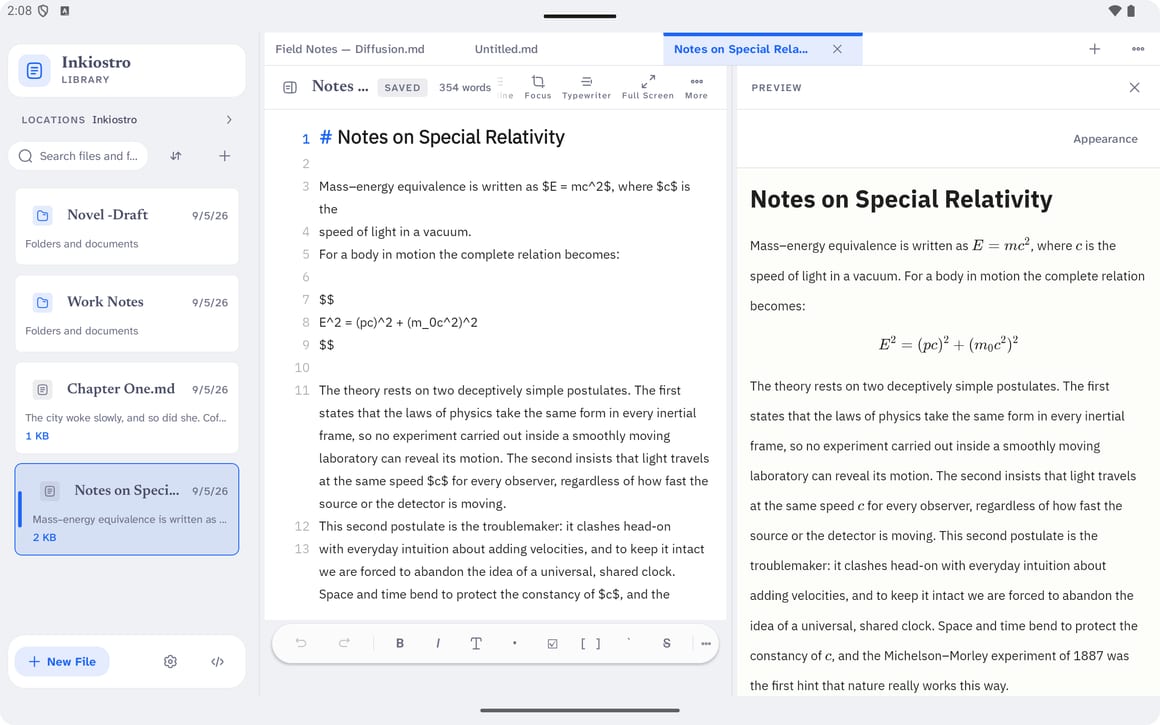
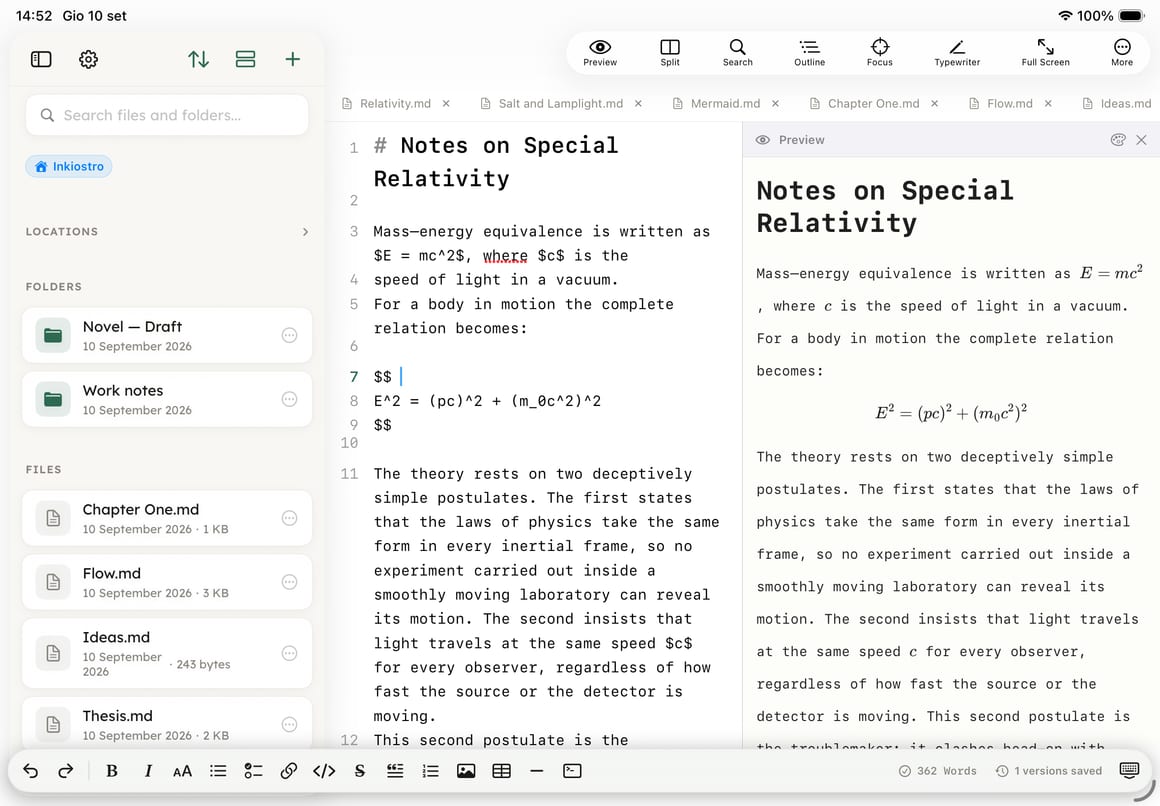
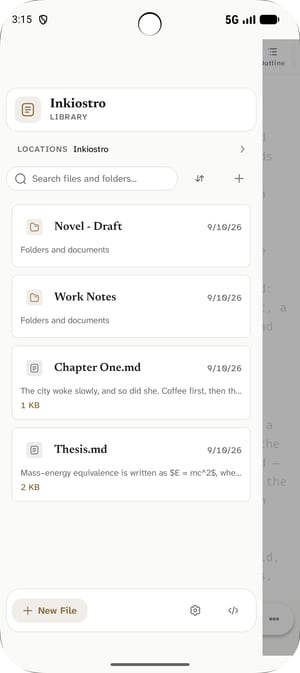
Three panes on a tablet, two on a foldable, one on a phone — the same app deciding what fits, not three different products.

Tablets

The file list, the editor and the live preview at the same time, with draggable dividers. Attach a keyboard and the shortcuts are the ones you already know.

Foldables

The layout follows the hinge. Open the device and the preview appears beside the text instead of replacing it; close it and the editor takes the whole page back.

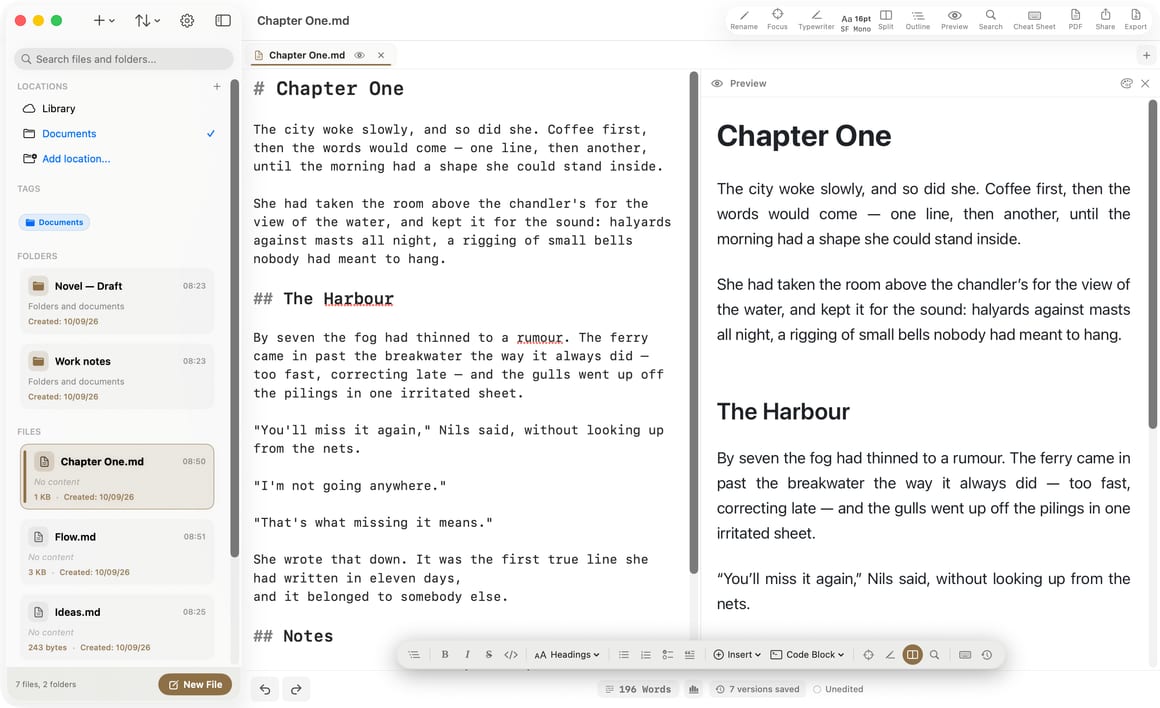
Desktop mode & Chromebooks

Resizable windows, right-click menus, hover states and a real pointer cursor. Nothing is locked to one orientation and nothing refuses to be resized.

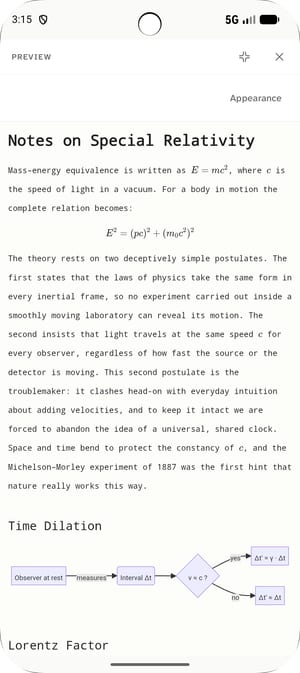
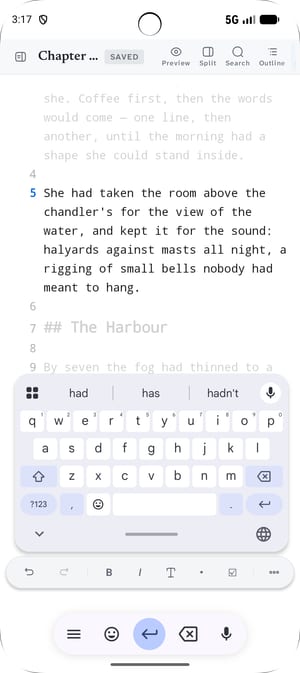
Phones

One pane at a time, the formatting island floating above the keyboard, and the preview a tap away. The small screen is the folded-down version, not the starting point.

Your files

They stay files. In your folder.

You pick a folder on the first run — internal storage, an SD card, a USB drive, whatever your file manager can reach. Inkiostro writes .md files into it and nothing else: no library to import into, no proprietary container, no copy of your work on a server you don't own. Open the same folder in another editor tomorrow and everything is there, because it never stopped being there.

  • Ordinary .md files you can read with any editor
  • Folders, tags and colour labels, kept alongside — never inside your text
  • Unlimited documents and folders, free, with no recursive counting to punish you for having many
Live preview

See it set while you write it

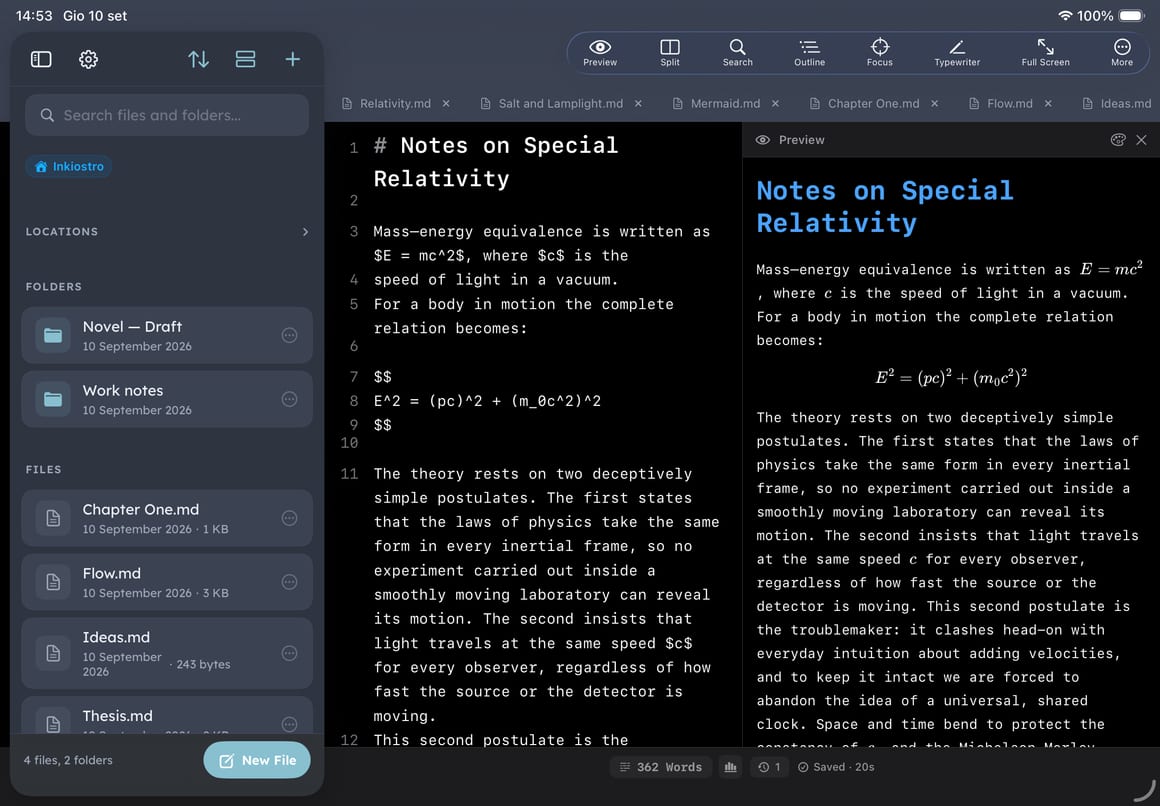
The preview renders as you type, in the same engine the Mac and iPhone versions use — so a document composed on one of the three looks the same on the other two. Maths and diagrams are not add-ons: LaTeX and Mermaid render live and survive the export as text, not as pictures of text.

  • 11 preview styles, all free — GitHub, Nord, Solarized, Terminal, Sepia and more
  • LaTeX/KaTeX formulas, inline and block, and Mermaid diagrams
  • Syntax highlighting in fenced code blocks, and images from your own folder
The editor

Fast enough to forget it's there

The editor is native Android text, not a web view pretending to be one: typing in a long document doesn't stutter and the highlighting repaints only the lines that changed. Lists continue themselves, tables keep their columns aligned as you Tab through them, and the formatting bar sits above the keyboard where your thumb already is.

  • Tabs, a document outline and a command palette
  • Find and replace, undo grouped by word, a line-number ruler
  • Ctrl shortcuts with a hardware keyboard, right-click menus with a mouse
Export

PDF is free. It always was.

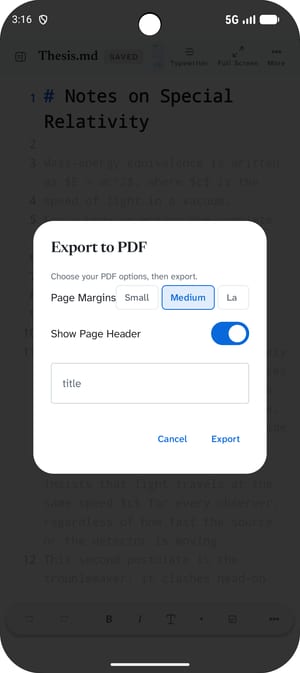
Charging for the export of a document you already wrote is a way of holding it hostage, so PDF export is free: your preview theme, your reading font, your margins, a title, a header, a footer and page numbers. Without Pro the pages carry a small credit line at the bottom — everything else is identical. HTML and EPUB are Pro; they are what you use to publish, not to keep a copy.

  • PDF with margins, header, footer and page numbers — free, with a small credit line
  • Self-contained HTML, fonts and images embedded — Pro
  • EPUB 3 for e-readers — Pro
Everything else

The rest of it

Document outline

Every heading in a column beside the text, filterable, with the section you're in highlighted. Tap to jump.

Tabs

Several documents open at once on a big screen, the way you already work when you're comparing two drafts.

Command palette

One shortcut, then type the name of what you want. Every command in the app, without hunting through menus.

Version history PRO

Automatic snapshots with a word-by-word diff, and restore of a single block instead of the whole file.

Focus & typewriter PRO

Dim everything but the sentence you're in, and keep the line you're writing at the height you're looking at.

29 themes

Five free and 24 with Pro, ported from the Mac app — plus 20 reading fonts bundled with the app, all free.

Statistics & daily goal

Words, characters, reading time, and a target that counts only what you actually typed today.

Markdown cheat sheet

The whole syntax in a panel beside the text, so you never have to leave the document to look something up.

Five languages

English, Italian, Spanish, German and French — the app and this page, not a machine translation of one.

Free & Pro

One purchase. Not a subscription.

Everything you need to write is free and has no time limit. Inkiostro Pro is a single purchase that unlocks the five things below, and a 7-day trial that starts when you ask for it — no card, no account, nothing to cancel.

  • Version history, with a word-by-word diff
  • Focus and typewriter modes
  • HTML and EPUB export, and PDF without the credit line
  • 24 of the 29 app themes
  • Unlimited external folders (one is free)
  • Every future update, at no extra cost
Get it on Google Play7-day trial · no card required
Line by line

What's free and what's Pro

The free version has no time limit, no document cap and no watermark. This is the whole list.

FeatureFreePro
Clean editor & live preview
Your documents as plain .md files in your own folder
Unlimited documents & folders, and file import
PDF export with margins, header, footer & page numbers
PDF pages without the credit line
11 preview styles
LaTeX math & Mermaid diagrams
Syntax highlighting in code blocks
20 reading fonts, bundled with the app
Outline, tabs & command palette
Find & replace, statistics, daily writing goal
Markdown cheat sheet
Available in 5 languages
App themes5 of 29
External folders1
Version history, with a word-by-word diff
Focus & typewriter mode
HTML & EPUB export
Coming from another editor

Inkiostro compared, honestly

Four editors people actually use on Android, with the cases where they are the better buy said out loud.

The other three

Also on iPhone, iPad and Mac

Inkiostro started on Apple platforms and the Android app is a native port, not a wrapper: same Markdown, same preview engine, same export. What it doesn't have yet is sync — the Apple versions use iCloud, and on Android your documents live in your folder. Google Drive is planned for a later version. Until then, a .md file in a shared folder crosses over just fine, because it's only ever a file.

See the iPhone, iPad & Mac version →
Questions

Before you install it

Is Inkiostro free on Android?
Yes. Downloading it costs nothing and the free version has no time limit and no document cap: unlimited documents and folders, live preview with 11 styles, LaTeX and Mermaid, syntax highlighting, PDF export with the full page setup (free pages carry a small credit line), 20 reading fonts, the outline, tabs, the command palette, statistics and the daily goal. Inkiostro Pro is one purchase — not a subscription — that adds version history, focus and typewriter modes, HTML and EPUB export, PDF without the credit line, all 29 themes and unlimited external folders. You can try Pro free for 7 days without entering a card.
Where are my documents stored?
In a folder you choose the first time you open the app — internal storage, an SD card, a USB drive, anything your file manager can reach. Inkiostro writes ordinary .md files there and nothing else. There is no library to import into and no hidden database: the folder is the library, and everything in it stays readable by any other editor, on Android or anywhere else.
Does it sync with my iPhone, iPad or Mac?
Not yet, and it would be dishonest to imply otherwise. The Apple versions sync through iCloud, which Android cannot reach; on Android your documents live in the folder you picked. Google Drive support is planned for a later version. In the meantime a .md file is just a file: put your folder inside a service that syncs folders and both sides see the same documents.
Does it work offline?
Completely. Writing, preview, LaTeX, Mermaid and every export work with the device in airplane mode, because none of it runs on a server. The app asks for internet access for one thing only: sending a support message, if you choose to write one.
Does Inkiostro collect any data?
No. The Android version has no analytics and no telemetry at all — not anonymous, not aggregated, none. There are no ads, no trackers and no account to create. Nothing you write leaves your device unless you export it or share it yourself.
Is it made for tablets or for phones?
Both, but it was drawn for the tablet first. On a large screen the file list, the editor and the live preview sit side by side with draggable dividers; on a foldable the layout follows the hinge; on a phone it folds down to one pane at a time with the formatting island above the keyboard. Nothing is locked to an orientation and nothing refuses to be resized.
Which version of Android do I need?
Android 10 or later. It runs on phones, tablets, foldables, Chromebooks that support Android apps, and in desktop modes such as Samsung DeX — with resizable windows, right-click menus, hover states and hardware-keyboard shortcuts.
Can I write maths and diagrams?
Yes, and for free. LaTeX/KaTeX formulas — inline $…$ and block equations — and Mermaid diagrams render live as you type, and they survive the export as real text rather than as pictures of text.
Can I open documents I wrote in another editor?
Yes. Point Inkiostro at the folder those documents are already in and they open as they are — no import step, no conversion, no copy. Markdown written in Obsidian, iA Writer, Markor or any other editor is the same Markdown, and Inkiostro leaves the file exactly where it found it.
Is Inkiostro Pro a subscription?
No. It is a single purchase that stays yours, including every future update. The 7-day trial starts when you ask for it, requires no card and no account, and simply ends — there is nothing to cancel.

It's free to find out

Unlimited documents, live preview, LaTeX, Mermaid and PDF export cost nothing and expire never. Pro is one purchase, whenever you decide it's worth it.

Get it on Google Play